"Automate L1 support" has become one of those phrases that means different things depending on who's selling it. For some vendors, it means a chatbot that deflects common questions to a knowledge base. For others, it means automation rules that route tickets based on keywords. For a few, it means an AI agent that actually handles the L1 workload end-to-end.
These are fundamentally different things with fundamentally different outcomes. The first two save some agent time. The third one changes your staffing model.

What L1 Actually Does
Before you can automate L1, you have to be honest about what L1 actually does. In most IT organizations, L1 support handles:
Password resets and account unlocks. The single highest-volume ticket category in almost every IT organization. Repetitive, well-documented, zero ambiguity.
Access requests. New hire needs access to a system. Employee changes roles and needs different permissions. Contractor needs temporary access. Each one follows a defined workflow with approval steps.
Status checks. "Is the VPN down?" "When will email be back?" "Is there a known issue with this application?" The user doesn't have a problem to solve. They have a question to answer.
Basic troubleshooting. "I can't connect to WiFi." "My Outlook isn't syncing." "The printer isn't working." Step-by-step resolution from documentation, with escalation if the steps don't fix it.
Ticket creation and routing. When the issue is beyond L1 scope, L1 creates a well-formed ticket with the right categorization, priority, and initial troubleshooting notes, then routes it to the right team.
That's the L1 job. Notice what it isn't: it isn't complex investigation, root cause analysis, system architecture decisions, or cross-team coordination. It's high-volume, well-documented, repetitive work that follows defined procedures.

The Three Levels of "Automation"
Level 1: Deflection (chatbot in front of the portal)
A language model sits in front of your knowledge base. Users ask questions. The model searches articles and surfaces matches. If the user says it helped, the interaction is counted as "deflected." If not, a ticket is created.
This is what most vendors sell as L1 automation. It reduces some ticket volume for questions that have good knowledge articles. It doesn't handle password resets, access requests, or any issue that requires action beyond surfacing information.
Level 2: Workflow automation (rules and triggers)
Automation rules classify tickets, assign them to queues, send canned responses, and trigger predefined workflows. "If category = password reset and user is verified, trigger the reset script." These work well for simple, predictable scenarios.
The limitation is that rules are static. They handle the cases you've anticipated and configured. Every new scenario requires a new rule. The rule engine becomes its own maintenance burden, and the gap between what rules can handle and what L1 agents actually do stays wide.
Level 3: AI agent resolution (the L1 agent is AI)
The AI agent doesn't deflect or route. It works the ticket. A user calls and says their account is locked. The AI verifies their identity, checks the account status in Active Directory, performs the unlock, confirms with the user, documents the resolution, and closes the ticket. No human touched it.
That same agent handles the next call about a printer not working. It asks diagnostic questions, walks the user through troubleshooting steps from the documentation, and either resolves the issue or creates a detailed ticket with everything the L2 team needs to pick it up.
This is what automate L1 support actually means in 2026. Not "fewer tickets reach humans." Instead: "the first-line resolution happens without humans for the categories that don't need human judgment."
What the AI Agent Needs
Moving from Level 1 or Level 2 to Level 3 isn't a model upgrade. It's a platform change. The AI agent needs:
Tools, not just knowledge. The agent needs to execute actions: reset passwords, check system status, create tickets, update records, send notifications, escalate to on-call teams. A language model with only knowledge base access is a search engine. A language model with tools is an agent.
Multi-channel presence. L1 support happens on voice calls, chat, email, Microsoft Teams, and SMS. The AI agent needs to handle all of them with the same resolution capability, not just the web portal.
Identity verification. Before taking any privileged action, the agent needs to verify who's asking. Multi-factor verification for write actions. Email verification for read actions. Anonymous access for knowledge base searches. Different security tiers for different action types.
Escalation intelligence. The agent needs to know what it doesn't know. When an issue exceeds its capabilities, it should escalate with full context: what the user reported, what diagnostic steps were taken, what was found, and why it's being escalated. The L2 team should pick up the ticket already briefed.
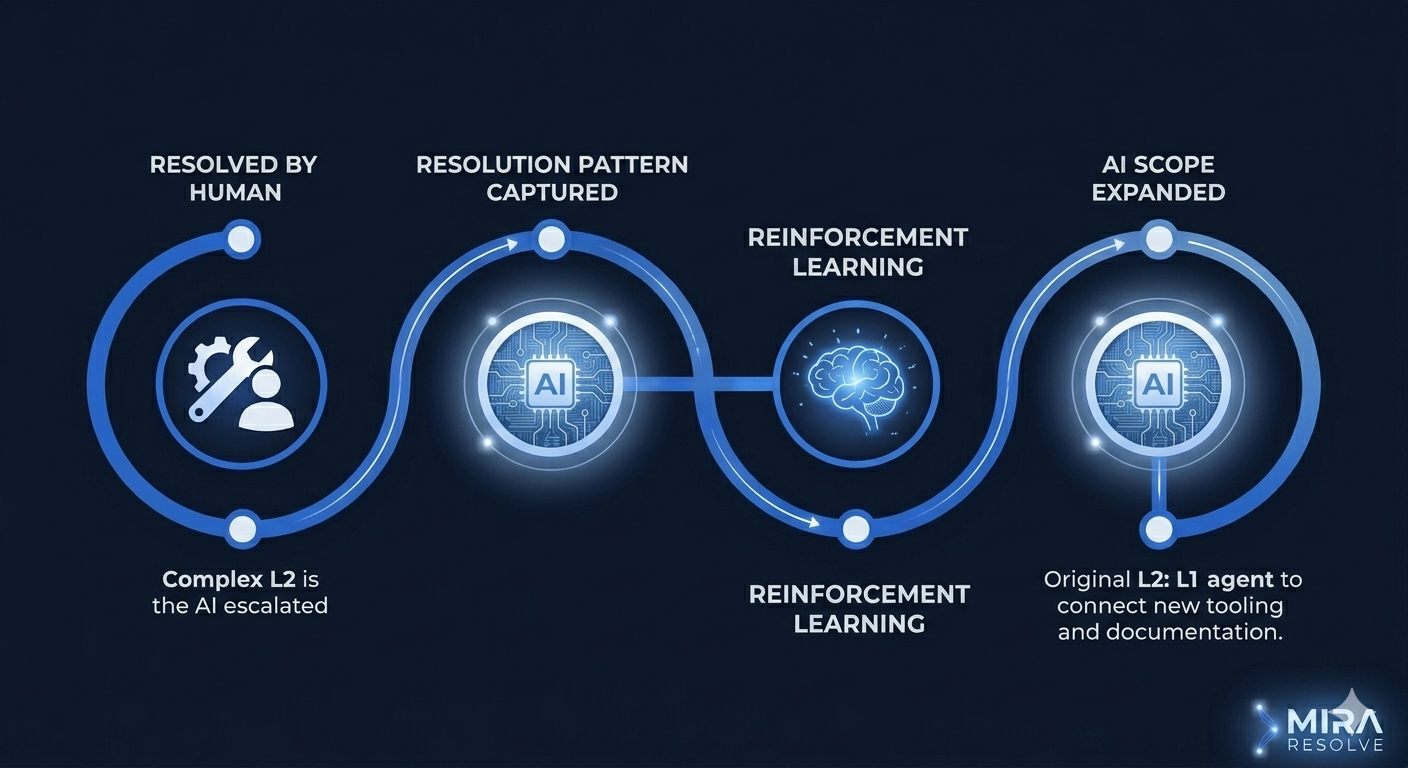
Learning from resolution. When a human resolves an issue that the AI couldn't, the platform should capture that resolution pattern. Over time, the AI's resolution scope expands: L1 tasks first, then increasingly complex L2 scenarios as more tooling and documentation are connected.
The Staffing Impact
When AI handles true L1 resolution, the staffing model changes. You don't need fewer L1 agents doing the same work. You need a different kind of team:
The AI handles high-volume, well-documented resolutions 24/7 across every channel. Your human team focuses on complex issues, process improvement, knowledge base curation, and the edge cases the AI escalates. The ratio shifts from "many agents handling many simple tickets" to "fewer specialists handling fewer complex tickets with AI as their co-worker."
That's not a cost-cutting play (though the economics work). It's a capability play. Your IT service desk goes from reactive ticket processing to proactive operational improvement. The human team does work that actually requires human judgment, and the AI handles the work that doesn't.

A Ramp, Not a Switch
This doesn't happen overnight. The realistic path is incremental:
Start with the highest-volume, most well-documented L1 categories. Password resets, account unlocks, status checks. Get the AI resolving those with confidence. Measure the results. Then expand to basic troubleshooting scenarios, access requests, and simple how-to questions. Each expansion connects more tools, adds more documentation to the AI's context, and increases the resolution scope.
That's a ramp, not a switch. The AI starts at L1 and grows toward L2 as more systems connect. The floor rises over time.
Mira Resolve is an AI-native ITSM platform built by Helios Core AI with a 32-tool AI agent that resolves tickets end-to-end across voice, chat, Microsoft Teams, email, and SMS. Learn more at Mira Resolve.